The Multi-Agent Symlink Kernel: Orchestrating Autonomous Agents Without Context Drift
 Aman Suryavanshi
The multi-agent symlink kernel: how I orchestrate Antigravity, Claude Code, and OpenCode without context drift
Copying and pasting custom skills between Claude Code, OpenCode, and Antigravity is architectural amateurism. When you run multiple autonomous coding agents across the same codebase, manual file synchronization guarantees silent capability drift, broken tool references, and bloated prompt context.
Over months of building production pipelines, my local AI toolchain fractured. I do not rely on a single assistant. I use Antigravity for high-level orchestration, research, and planning; Claude Code for terminal refactoring and execution; OpenCode for autonomous repository-wide loops; and harnesses like Codex and DeepSeek Harness for second-opinion audits. In theory, specialized agents handle distinct lifecycle phases. In practice, running six autonomous agents without a unified operating system kernel produced immediate, chaotic capability drift.
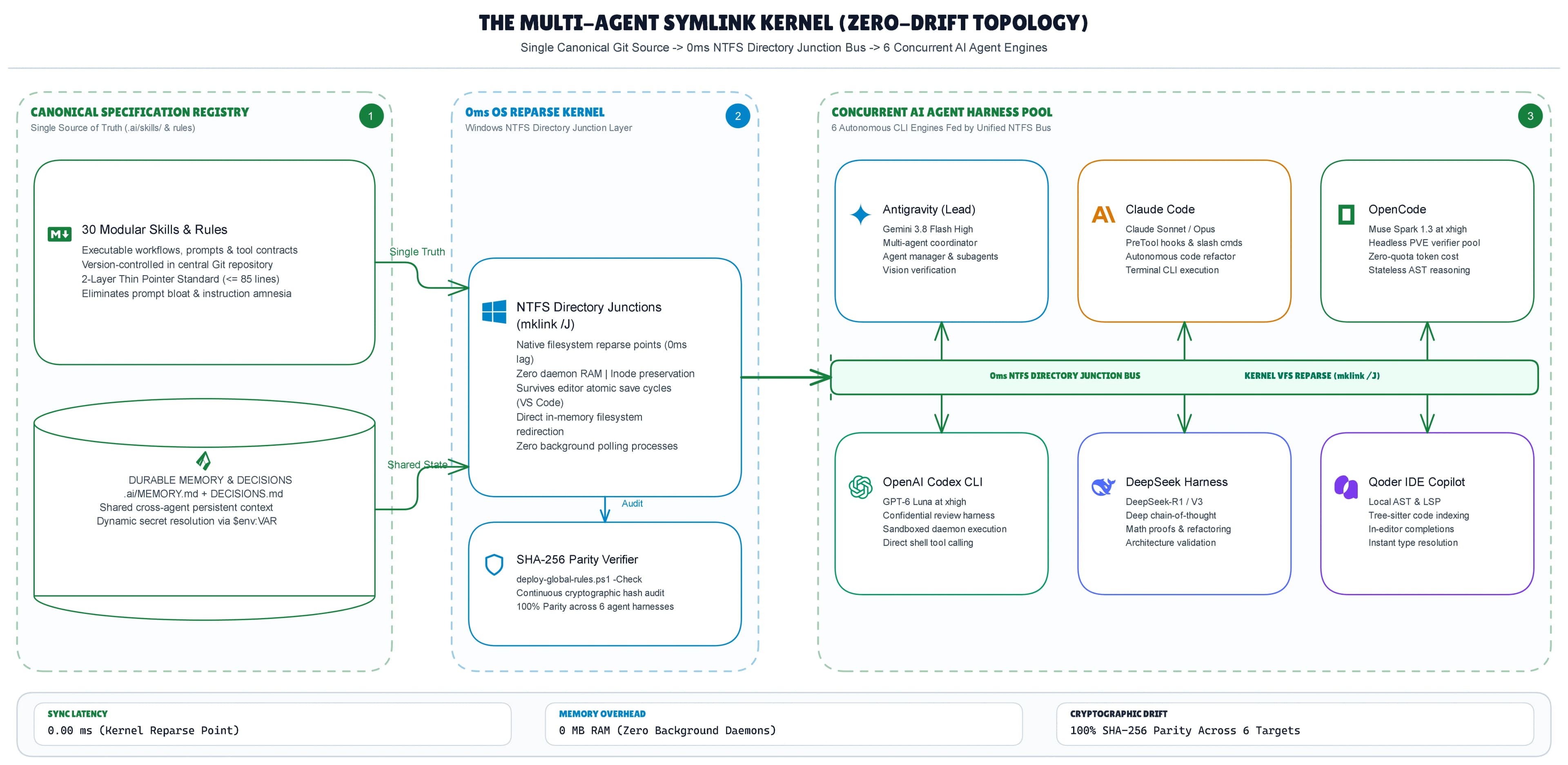
I resolved this divergence by replacing user-space sync scripts with an operating system primitive: the Private Multi-Agent Symlink Kernel. Powered by native Windows Directory Junctions and a strict 2-Layer Thin Pointer Standard, this architecture locks thirty production workflows across six agent surfaces with zero sync latency, zero memory overhead, and zero configuration drift.
The anatomy of multi-agent capability drift
Multi-agent capability drift occurs when distinct AI coding assistants operate on desynchronized versions of shared instructions, custom tool definitions, or workspace rulebooks. When an engineer patches a skill or rule in one agent directory without updating the others, the agents execute diverging logic, leading to duplicate bug reproduction and wasted context windows.
The friction began in my custom skills library. Across dozens of client builds, I developed thirty discrete, production-hardened workflows. These included n8n-master for autonomous workflow construction, nextjs-expert for App Router patterns, owasp-security for vulnerability auditing, and deep-research-team for verified multi-source intelligence gathering.
Every agent framework expects these custom instructions in its own proprietary home path:
- Claude Code looks inside
~/.claude/skills/ - OpenCode parses
~/.config/opencode/skills/ - Codex expects
~/.codex/skills/ - Antigravity reads from
~/.gemini/antigravity/skills/
To make my workflows available across all tools, I initially copied folders between directories. That naive approach collapsed almost immediately. During a live terminal session in Claude Code, I encountered an edge case in an external API integration, patched the Python error handling inside Claude's skill folder, and verified the fix. Two days later, I tasked OpenCode with a background refactor of the same service. OpenCode crashed on the exact bug I had already solved forty-eight hours prior.
The harnesses were executing conflicting versions of my mental model. I had zero visibility into which directory contained the canonical patch. My local development environment degraded into an unmaintainable maze of conflicting markdown files, broken tool paths, and fragmented context.
Gotcha: Manually duplicating agent rulebooks guarantees version divergence. The moment you patch a workflow in your primary terminal, any agent running from a secondary directory becomes an operational liability.
The Windows atomic save trap: why file hardlinks break silently
File-level hardlinks break under modern code editors because applications like VS Code, JetBrains, and Cursor execute atomic writes that delete and recreate files rather than overwriting existing bytes in place. When an editor writes to a temporary file, unlinks the original file, and renames the temporary file to the original path, the operating system severs the underlying NTFS Master File Table inode binding permanently.
When I first attempted to solve skill drift, I tested native file-level hardlinks using mklink /H. The idea seemed sound: point every agent configuration file to a single source file on disk without duplicating data. The implementation failed on the first edit.
Modern developer editors do not perform unsafe in-place byte overwrites. Instead, they follow a three-stage atomic write pattern:
- Write the new document buffer to a hidden temporary file (for example,
.CLAUDE.md.tmp). - Issue a filesystem
unlinksystem call on the original target file (CLAUDE.md). - Rename the temporary file to match the original target filename.
[Editor Save Buffer]
 │
 ▼
1. Write temp file (CLAUDE.md.tmp) on new MFT Inode 98231
 │
 ▼
2. Unlink / Delete original CLAUDE.md (Severing Inode 41205)
 │
 ▼
3. Atomic Rename (CLAUDE.md.tmp -> CLAUDE.md)
 │
 ▼
[Result] Secondary agents remain bound to orphaned Inode 41205
Because an NTFS hardlink binds directly to the specific MFT record number of the file, deleting the original target during step two severs the link entirely. The newly renamed file receives a brand new MFT record number. The remaining agent directories remain attached to the dead, orphaned record. The secondary agents were reading frozen, outdated snapshots while my active editor saved to a completely separate inode.
I resolved this failure mode by shifting the abstraction layer up from individual file hardlinks to NTFS Directory Junctions (mklink /J). Directory Junctions operate at the folder level within the filesystem namespace as reparse points. They bind directory paths rather than individual file records. When an editor performs an atomic write, deletes a file, and recreates it inside a junctioned folder, the directory reparse point remains completely unaffected.
The two-plane solution architecture
The Private Multi-Agent Symlink Kernel organizes multi-agent configuration into two isolated architectural planes: a Canonical Skills Registry that distributes tool definitions through directory reparse points, and a Private Configuration Kernel that manages global behavioral rules through thin pointer documents. This separation eliminates context bloat while isolating sensitive credentials from public code repositories.
+-------------------------------------------------------------+
| LOCAL FILESYSTEM CORE |
| |
| Plane 1: Canonical Skills Registry |
| C:/Users/dev/.gemini/antigravity/skills/ |
| (30 Modular Tool Workflows) |
| │ │ │ |
| │ mklink /J │ mklink /J │ mklink /J |
| ▼ ▼ ▼ |
| Claude Code OpenCode Codex |
| ~/.claude/skills/ ~/.config/... ~/.codex/skills/ |
| |
| Plane 2: Private Configuration Kernel |
| C:/Users/dev/.gemini/global-configs/ (Git-Backed) |
| ├── GLOBAL_AI_RULES.md (Master Rulebook) |
| └── Agent Entry Pointers (<= 85 lines thin pointers) |
+-------------------------------------------------------------+Plane 1: The canonical skills registry
I centralized all thirty modular workflows into a single canonical source of truth at C:/Users/dev/.gemini/antigravity/skills/. Using Windows Developer Mode, which enables non-improves symlink and junction creation, I mapped every agent harness directly back to this central directory:
# Establish NTFS Directory Junctions to the Canonical Skills Registry
cmd /c mklink /J "$env:USERPROFILE\.claude\skills" "$env:USERPROFILE\.gemini\antigravity\skills"
cmd /c mklink /J "$env:USERPROFILE\.config\opencode\skills" "$env:USERPROFILE\.gemini\antigravity\skills"
cmd /c mklink /J "$env:USERPROFILE\.codex\skills" "$env:USERPROFILE\.gemini\antigravity\skills"
cmd /c mklink /J "$env:USERPROFILE\.dsh\skills" "$env:USERPROFILE\.gemini\antigravity\skills"
cmd /c mklink /J "$env:USERPROFILE\.antigravity\skills" "$env:USERPROFILE\.gemini\antigravity\skills"
cmd /c mklink /D "$env:USERPROFILE\.qoder\skills" "$env:USERPROFILE\.gemini\antigravity\skills"
Because these junctions resolve directly inside the NTFS file system driver, resolution latency is zero milliseconds. When Claude Code executes a patch on an internal skill script, OpenCode and Antigravity immediately read the updated byte stream on their subsequent turn.
Plane 2: The private configuration kernel
Global agent behavior presents a distinct problem. Storing private operating parameters, client architectural requirements, and business rules inside a public skills folder risks accidental leaks during open-source distribution. To prevent this exposure, I decoupled governance rules from tool logic.
I established a private Git repository at C:/Users/dev/.gemini/global-configs/. This repository stores the master rulebook (`GLOBALAIRULES.md`) along with harness-specific entry manifests. Git version control tracks every prompt change, provides audit logs, and allows deterministic rollbacks if an instruction induces hallucination loops.
Enforcing configuration integrity with cryptographic SHA-256 checks
Cryptographic drift detection guarantees configuration integrity by comparing the SHA-256 hashes of live agent home files against the version-controlled repository baseline before executing agentic workflows. This automated validation step prevents manual edits from desynchronizing local agent environments.
While folder junctions solve skill synchronization, root entry rulebooks like CLAUDE.md, GEMINI.md, and global-standards.md often require separate files due to tool-specific metadata parsers. To manage these entry points without manual intervention, I wrote a deterministic deployment engine: deploy-global-rules.ps1.
# deploy-global-rules.ps1
# Deploys canonical global rule files FROM repository OUT to each agent home path.
# Usage:
# powershell -File deploy-global-rules.ps1 # interactive deploy
# powershell -File deploy-global-rules.ps1 -Check # diff-only drift guard
# powershell -File deploy-global-rules.ps1 -Force # non-interactive overwrite
param(
 [switch]$Check,
 [switch]$Force
)
$ErrorActionPreference = "Stop"
$repoRoot = $PSScriptRoot

# Mapping repo source files to live agent paths
$map = @(
 @{ Repo = "claude/CLAUDE.md"; Live = "$env:USERPROFILE/.claude/CLAUDE.md" },
 @{ Repo = "gemini/GEMINI.md"; Live = "$env:USERPROFILE/.gemini/GEMINI.md" },
 @{ Repo = "opencode/global-standards.md"; Live = "$env:USERPROFILE/.config/opencode/rules/global-standards.md" },
 @{ Repo = "codex/AGENTS.md"; Live = "$env:USERPROFILE/.codex/AGENTS.md" },
 @{ Repo = "dsh/AGENTS.md"; Live = "$env:USERPROFILE/.dsh/AGENTS.md" },
 @{ Repo = "qoder/AGENTS.md"; Live = "$env:USERPROFILE/.qoder/AGENTS.md" }
)

Write-Host "=== Deploy Global Rules (repo -> live) ===" -ForegroundColor Green
if ($Check) { Write-Host "MODE: CHECK (diff-only, no writes)" -ForegroundColor Yellow }

$drift = 0
foreach ($m in $map) {
 $src = Join-Path $repoRoot $m.Repo
 $dst = $m.Live
 if (.(Test-Path $src)) {
 Write-Host " [MISS] repo source not found: $src" -ForegroundColor Red
 continue
 }
 $srcHash = (Get-FileHash $src -Algorithm SHA256).Hash
 $dstHash = if (Test-Path $dst) { (Get-FileHash $dst -Algorithm SHA256).Hash } else { "MISSING" }

 if ($srcHash -eq $dstHash) {
 Write-Host " [OK] in sync: $dst" -ForegroundColor Gray
 continue
 }

 $drift++
 Write-Host " [DRIFT] differs: $dst" -ForegroundColor Yellow
 if ($Check) { continue }

 if (-not $Force) {
 $ans = Read-Host " Overwrite live with repo copy? (y/N)"
 if ($ans -ne "y") {
 Write-Host " skipped." -ForegroundColor Gray
 continue
 }
 }

 $dstDir = Split-Path $dst
 if (.(Test-Path $dstDir)) {
 New-Item -ItemType Directory -Path $dstDir -Force | Out-Null
 }
 Copy-Item $src $dst -Force
 Write-Host " deployed." -ForegroundColor Green
}

if ($Check) {
 Write-Host "`nCheck complete. $drift file(s) drifted from repo source of truth." -ForegroundColor Cyan
 if ($drift -gt 0) {
 Write-Host "Run without -Check to deploy updates deterministically." -ForegroundColor Cyan
 }
} else {
 Write-Host "`nDeploy complete." -ForegroundColor Green
}Running powershell -File deploy-global-rules.ps1 -Check runs an instant cryptographic audit across all active agent configurations. If I modify an instruction in one location without committing it to the repository kernel, the engine flags the drift immediately.
The 2-layer thin pointer standard: eliminating prompt bloat
The 2-Layer Thin Pointer Standard restricts root agent configuration files to 85 lines or fewer containing only mandatory behavioral invariants, while routing detailed domain knowledge through on-demand file links. This prevents large master rulebooks from consuming context tokens on every turn.
Industry research across developer communities indicates that bloated 200+ line instruction files waste up to 15% of session token budgets on ignored rules. In extended multi-agent sessions, large system prompts compete directly with active codebase tokens in the attention window, accelerating context compaction and instruction amnesia.
My master rulebook, `GLOBALAIRULES.md`, is a 25KB document containing architectural boundaries, test mandates, and security policies. Ingesting 25KB of system instructions on every conversational turn across six agents burns API tokens rapidly and crowds out actual code context.
To solve this, I designed the 2-Layer Thin Pointer Standard:
- Layer 1 (Live Agent Entry Point): Hard-capped at 85 lines or fewer. Stored directly at
~/.claude/CLAUDE.md,~/.gemini/GEMINI.md, and~/.codex/AGENTS.md. It defines runtime invariants, error recovery procedures, and file paths to the master repository. - Layer 2 (On-Demand Deep Rules): The comprehensive rulebook stored in the private kernel. The agent reads specific line slices or sub-modules only when a task demands that specific context.
<., ~/.claude/CLAUDE.md: 2-Layer Thin Pointer Example (<= 85 lines) , >
# Live Agent Invariants

## Core Execution Directives
1. Do not overwrite existing configuration files without verification.
2. When generating shell commands, use canonical syntax and forward-slash paths.
3. Do not run destructive git commands without user confirmation.

## Deep Governance Reference
When modifying database migrations, API schemas, or multi-agent workflows,
read the specific operational guidelines before executing:
- Multi-Agent Orchestration: `C:/Users/dev/.gemini/global-configs/rules/orchestration.md`
- Production Security Policy: `C:/Users/dev/.gemini/global-configs/rules/security.md`
- Target Architecture Standards: `C:/Users/dev/.gemini/global-configs/rules/standards.md`
By capping the entry pointer at 85 lines, my agents retain non-negotiable constraints while preserving over 90% of their initial context window for codebase tokens.
OpenCode configuration gotchas: handling absolute paths
OpenCode resolves relative instruction paths against its own installation folder rather than the active workspace root, causing startup crashes when using standard relative links. Decoupling the static rulebook into an absolute path reference while leaving the core configuration file uncommitted prevents runtime corruption.
During implementation, OpenCode presented an unexpected failure mode. While Claude Code and Gemini CLI read markdown manifests directly from the root of the user directory, OpenCode requires a structured configuration file at ~/.config/opencode/opencode.json.
When I first added relative paths pointing to my global rule files within the instructions array, OpenCode crashed on initialization:
// Broken configuration: OpenCode attempts to resolve from ~/.config/opencode/
{
 "instructions": [
 "./rules/global-standards.md"
 ]
} // Result: Fatal path resolution failure at process launch
OpenCode does not resolve relative paths against the active workspace root. It resolves them relative to the directory containing opencode.json. also, attempting to symlink the entire opencode.json file into my repository caused ongoing file lock collisions. OpenCode actively writes to its configuration file at runtime whenever you switch model providers or update internal telemetry settings.
I resolved this friction by decoupling the runtime state from the instruction set. I left opencode.json as an uncommitted local runtime file, and configured its instructions array to target the canonical markdown rulebook via an explicit absolute path:
{
 "$schema": "https://opencode.ai/config.json",
 "instructions": [
 "C:/Users/dev/.gemini/global-configs/opencode/global-standards.md"
 ]
}
This configuration isolates OpenCode's dynamic state updates from my version-controlled rulebook, ensuring stability across execution cycles.
Architectural trade-offs: NTFS junctions vs dotfile managers
Evaluating file synchronization methods requires balancing operating system dependency, runtime latency, and process overhead. While third-party utilities provide cross-platform portability, native operating system primitives offer zero-overhead execution without background daemons.
| Evaluation Metric | User-Space Sync Daemons (Chezmoi / Stow) | Background File Watchers (Chokidar / Node) | Native Multi-Agent Symlink Kernel (NTFS Junctions) | | :--- | :--- | :--- | :--- | | Sync Latency | Manual execution or polling delay (500ms+) | 100ms to 500ms debounce loop | 0ms (Direct OS kernel reparse) | | Memory Footprint | 0MB (CLI only, requires manual trigger) | 45MB to 120MB continuous RAM | 0MB (Handled by NTFS driver) | | Atomic Save Resistance | Vulnerable without watch triggers | High (Re-syncs on file close) | Absolute (Junctions bind folder namespace) | | Token Context Overhead | High if full rulebooks are cloned | High if rulebooks are cloned | Ruthlessly optimized (<= 85 lines thin pointer) | | Cross-Platform Portability | Native Unix and Windows support | Universal Node.js support | Windows native (Requires symlink adaptation on Linux) |
Trade-off 1: Kernel primitives vs third-party managers
Choosing native NTFS Directory Junctions over dedicated dotfile managers like GNU Stow or Chezmoi prioritizes operational simplicity over tool standardization. Dotfile managers require manual execution or wrapper scripts to synchronize updates across directories. If I patch a skill inside a Claude Code session, I do not want to run a separate CLI command before launching OpenCode. Junctions resolve at the filesystem driver level, eliminating synchronization steps entirely.
The cost of this decision is operating system specificity. Windows Directory Junctions (mklink /J) are specific to NTFS. When reproducing this architecture on Linux or macOS environments, you must substitute junctions with standard absolute symbolic links (ln -s).
Trade-off 2: Runtime isolation vs automated pointer symlinking
Hardlinking root configuration files like CLAUDE.md directly into a single file creates vulnerability to atomic save breakage. Deploying thin pointers via deploy-global-rules.ps1 introduces a deliberate manual step for root entry rulebooks.
The gain is total system reliability. The PowerShell deployment script ensures that root instructions remain valid even if an editor replaces an entire document during an atomic save. The trade-off is that updating a root invariant requires executing the deployment script with -Force, whereas skill modifications inside junctioned folders update instantaneously.
Real-world receipts: the 74-node production benchmark
Deterministic multi-agent synchronization is not a theoretical experiment. It serves as the foundation for my daily engineering operations, managing thirty active workflows across six distinct harnesses: Antigravity, Claude Code, OpenCode, Codex, DeepSeek Harness, and Qoder.
Over six months of active development, this architecture eliminated the 30% to 40% session loss typically spent diagnosing diverging agent behavior. The exact same architectural philosophy powers my enterprise production systems:
- OmniPost-Core: A 74-node autonomous publishing engine maintaining 99.7% uptime reliability while processing multi-channel distribution without human intervention.
- Aviators Training Centre: A production web infrastructure and automation pipeline where deterministic routing helped drive over ₹3,00,000 in revenue.
Grounding multi-agent orchestration directly into operating system primitives ensures that when one agent solves a complex bug, every assistant across the stack inherits that operational intelligence immediately.
Frequently asked questions about multi-agent rule management
Why does Claude Code ignore rules in CLAUDE.md during long sessions? Claude Code deprioritizes instructions in CLAUDE.md during long sessions because active conversation tokens and codebase context push initial system prompts out of the model's effective attention window. When context compaction occurs, long rulebooks are summarized and compressed. To prevent instruction amnesia, cap your root CLAUDE.md file at 85 lines or fewer using thin pointers that instruct the model to load specific rule files on demand.
What is the difference between a Windows Directory Junction and a Symbolic Link? A Windows Directory Junction (mklink /J) is an NTFS reparse point that resolves directory targets locally on the host machine without requiring improves administrator privileges. Symbolic links (mklink /D) can target remote network shares and relative paths, but often require administrative permissions or Windows Developer Mode. For local multi-agent skill routing, directory junctions provide the most stable cross-directory binding.
How do I prevent sensitive client rules from leaking into public AI skill folders? To protect sensitive data, separate your configuration into two distinct planes: store public, shareable skills in a canonical registry, and isolate proprietary operating instructions, client architecture rules, and credentials in a private, version-controlled Git repository. Use thin pointer entry files in your agent home directories that reference the private repository paths directly.
Architecture debate & peer notes
Where do you draw the architectural boundary between operating system filesystem primitives and dedicated configuration managers like Chezmoi or GNU Stow when synchronizing AI developer tooling?
If you are running multi-agent CLI workflows and hitting path resolution or context bloat issues, compare notes with me on GitHub or discuss implementation details on [Twitter/X](https://twitter.com/_AmanSurya). For full system blueprints and case studies, review my work on my Portfolio.
● Key Takeaways
- 1.Replace manual skill copying with centralized OS Directory Junctions (mklink /J) to achieve zero-latency updates across all agent harnesses.
- 2.Avoid file-level hardlinks (mklink /H) for editable rulebooks because modern IDE atomic saves sever inode bindings silently.
- 3.Enforce the 2-Layer Thin Pointer Standard by restricting root entry rulebooks to 85 lines or fewer to eliminate prompt token bloat.
- 4.Isolate sensitive organizational instructions and client rules within a private Git repository completely separated from public skill directories.
- 5.Deploy cryptographic SHA-256 drift verification to audit and synchronize rule changes deterministically across agent surfaces.
Frequently Asked Questions

Let's Create Something Amazing Together!
Whether you have a project in mind or just want to connect, I'm always excited to collaborate and bring ideas to life.
Continue the Journey
Thanks for taking the time to explore my work! Let's connect and create something amazing together.