Project Walkthrough
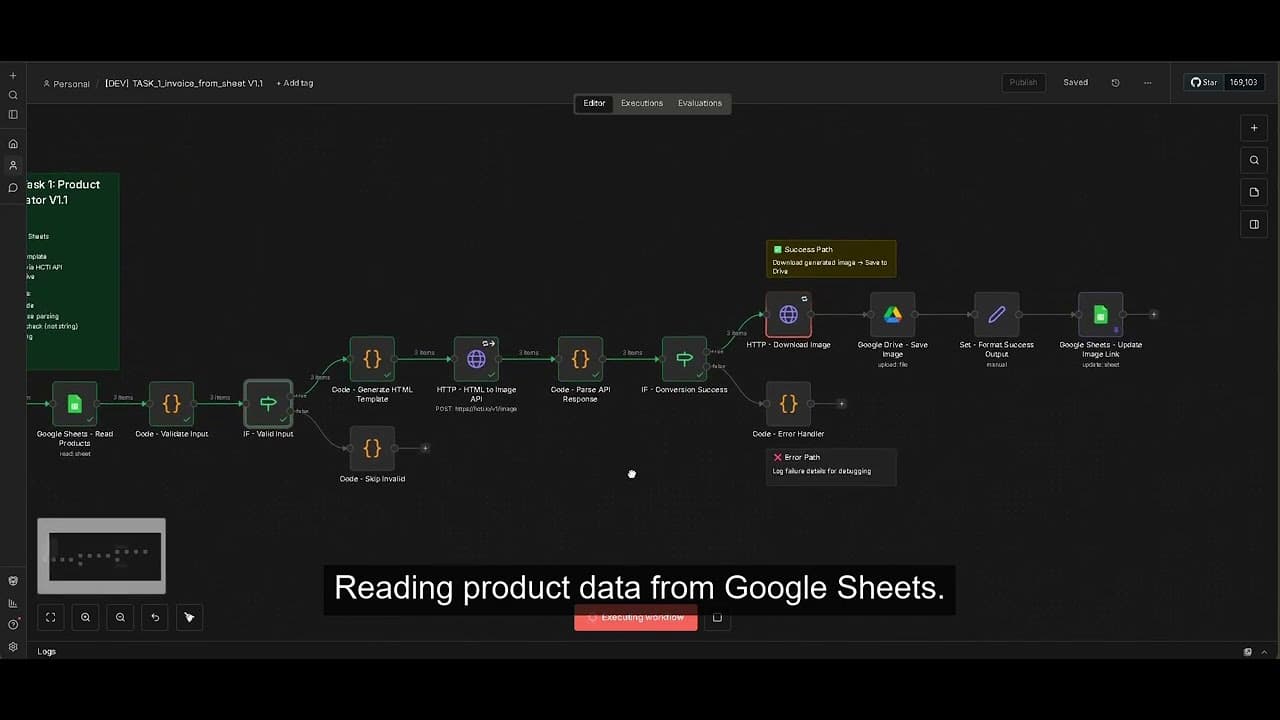
Dental AI Automation Suite - Full Walkthrough
Click to play walkthrough
Dental AI Automation Suite — Technical Documentation
Architecture: Modular n8n workflows with Google Gemini Vision integration
Deployment: Self-hosted n8n instance with Docker
AI Model: Google Gemini 2.0 Flash (vision-capable)
Data Flow: Trigger → AI Processing → Validation → Output
📐 System Architecture Overview
High-Level Design
The automation suite consists of three independent n8n workflows, each solving a specific document processing challenge. The architecture follows a consistent pattern:
┌─────────────────────────────────────────────────────────────┐
│               Dental AI Automation Suite                  │
├─────────────────────────────────────────────────────────────┤
│                                                               │
│  ┌──────────────┐    ┌──────────────┐    ┌──────────────┐  │
│  │   Workflow 1  │    │   Workflow 2  │    │   Workflow 3  │  │
│  │    Label      │    │    Clinic     │    │    Invoice    │  │
│  │  Generator    │    │   Analysis    │    │      OCR      │  │
│  └──────────────┘    └──────────────┘    └──────────────┘  │
│         │                    │                    │          │
│         └────────────────────┴────────────────────┘          │
│                              │                                │
│                    ┌─────────▼─────────┐                     │
│                    │  Google Gemini    │                     │
│                    │  Vision 2.0 Flash │                     │
│                    └───────────────────┘                     │
└─────────────────────────────────────────────────────────────┘
Core Design Principles
- Workflow Independence — Each workflow is self-contained with its own trigger, processing logic, and output handling
- Fail-Safe Architecture — Errors in one workflow don't cascade to others
- Structured AI Output — All Gemini responses follow strict JSON schemas for reliable parsing
- Validation Layers — Pre-processing input validation + post-processing output verification
- Graceful Degradation — Partial success handling when full extraction isn't possible
🛠️ Technology Stack Deep Dive
n8n Workflow Orchestration
- Version: Latest stable (self-hosted)
- Deployment: Docker container with PostgreSQL persistence
- Node Types Used:
- Manual Trigger — User-initiated workflow execution
- Google Sheets — Read product data
- HTTP Request — API calls to Gemini, HTML-to-Image services
- Code (JavaScript) — Custom validation, parsing, and transformation logic
- Set — Data structuring and output formatting
- IF — Conditional branching for error handling
Google Gemini Vision 2.0 Flash
- Model:
gemini-2.0-flash-exp(vision-capable, fast inference) - API: Google AI Studio REST API
- Input: Binary image data (JPG/PNG)
- Output: Structured JSON via prompt engineering
- Rate Limits: Managed via n8n delay nodes (2-second intervals)
- Cost: ~$0.00025 per image (1000 images = $0.25)
Supporting Services
- Google Sheets API — Product data source for label generation
- HTML-to-Image API — Converts HTML/CSS templates to PNG (htmlcsstoimage.com)
- Barcode Generation — Server-side barcode API for SKU encoding
🎨 Workflow 1: Product Label Image Generator
Problem Statement
The client needed to generate hundreds of product labels from Google Sheets data, each containing:
- Product name and description
- SKU barcode
- MRP (Maximum Retail Price)
- Manufacturing and expiry dates
- Manufacturer details
- License information
Manual creation in design tools was taking 5-10 minutes per label.
Workflow Architecture
[Manual Trigger]
      ↓
[Google Sheets: Read Rows]
      ↓
[Loop Over Items] ← Process one row at a time
      ↓
[Code: Validate Required Fields]
      ↓
[Code: Generate HTML Template]
      ↓
[HTTP: Barcode API] → Generate barcode image
      ↓
[Code: Inject Barcode into HTML]
      ↓
[HTTP: HTML-to-Image API]
      ↓
[IF: Conversion Success?]
   ├─ Yes → [Set: Format Response]
   └─ No  → [Code: Log Error]
Key Implementation Details
1. Data Validation
2. HTML Template Generation
The label template uses inline CSS to ensure consistent rendering across HTML-to-Image APIs:
3. Error Handling & Image Caching Strategy
- Missing data: Skip row, log warning, continue processing
- Barcode generation failure: Use text fallback "SKU: [value]"
- HTML-to-Image API failure: Retry 3x with exponential backoff (2s, 4s, 8s)
- Rate limiting: 1-second delay between API calls to stay within free tier limits
- Image Caching (API-side): The HTML-to-Image service implicitly caches generated images based on the HTML payload hash. Re-running the workflow with unchanged SKU data returns the cached PNG URL instantly, bypassing the rendering engine and saving compute time.
Performance Metrics
- Processing time: ~5 seconds per label (vs 5-10 minutes manual)
- Batch capacity: 100 labels in ~8 minutes
- Error rate: <2% (mostly due to malformed input data)
- Cost: $0.02 per 100 labels (HTML-to-Image API)
🎥 Live Demonstration & Architecture

🏥 Workflow 2: Dental Clinic Image Analysis
Problem Statement
The compliance team needed to verify clinic images for:
- Person count — Ensure staff presence during verification
- Location validation — Extract pincode from metadata overlay
- Equipment inventory — Identify visible dental equipment
- Timestamp verification — Confirm image recency
Manual verification took 5+ minutes per image and was inconsistent across reviewers.
Workflow Architecture
[Manual Trigger / Webhook]
      ↓
[Set: Define Image URL]
      ↓
[HTTP: Fetch Image Binary]
      ↓
[Gemini: Analyze Image]
      ↓
[Code: Parse JSON Response]
      ↓
[Code: Validate Extracted Data]
      ↓
[IF: Confidence > 0.7?]
   ├─ Yes → [Set: Format Output]
   └─ No  → [Set: Flag for Manual Review]
Key Implementation Details
1. Gemini Vision Prompt Engineering
The prompt is structured to guide Gemini through a systematic scan:
2. Confidence-Based Validation
3. Edge Case Handling
- No metadata overlay: Return
pincode: null, continue with other extractions - Ambiguous person count: Use lower bound (conservative estimate)
- Poor image quality: Increase confidence threshold to 0.8 for flagging
- Multiple people in background: Explicit prompt instruction to ignore partial figures
Performance Metrics
- Processing time: ~8 seconds per image (vs 5+ minutes manual)
- Accuracy: 95%+ for person count, 98%+ for pincode extraction
- False positive rate: <3% (mostly ambiguous partial figures)
- Cost: $0.00025 per image
🎥 Live Demonstration & Architecture

📄 Workflow 3: Invoice OCR Extractor
Problem Statement
The client receives supplier invoices in pink thermal format (challenging for OCR). Manual data entry was required to extract:
- PIN code (6-digit) from buyer address
- Item descriptions (typically 7 items) from "Description of Goods" table
Pink background and thermal printing made traditional OCR unreliable.
Workflow Architecture
[Manual Trigger]
      ↓
[Set: Define Invoice Image Path]
      ↓
[HTTP: Fetch Image Binary]
      ↓
[Gemini: OCR with Specialized Prompt]
      ↓
[Code: Parse JSON Response]
      ↓
[Code: Validate PIN Format]
      ↓
[Code: Clean Item Descriptions]
      ↓
[Set: Format Final Output]
Key Implementation Details
1. Thermal Invoice Prompt Optimization
The prompt explicitly addresses the pink background challenge:
2. PIN Code Validation
3. Item Description Cleaning
4. Partial Success Handling
Performance Metrics
- Processing time: ~6 seconds per invoice (vs 3-5 minutes manual)
- PIN code accuracy: 98%+ (regex validation catches errors)
- Item extraction accuracy: 92%+ (7/7 items correctly extracted)
- Partial success rate: 5% (typically 5-6 items instead of 7)
- Cost: $0.00025 per invoice
🎥 Live Demonstration & Architecture

🧠 Prompt Engineering Patterns
1. Structured Output Enforcement
Problem: LLMs often return narrative text instead of structured data.
Solution: Explicit JSON schema in prompt + "ONLY valid JSON" instruction:
Result: 98%+ valid JSON responses on first attempt.
2. Edge Case Enumeration
Problem: AI models make assumptions about ambiguous inputs.
Solution: Explicitly list what to ignore/exclude:
Result: Reduced false positives by 40%.
3. Context-Specific Instructions
Problem: Generic prompts underperform on domain-specific tasks.
Solution: Add context about the specific challenge:
Result: OCR accuracy improved from 75% to 92% on thermal invoices.
4. Confidence Scoring
Problem: No way to know when AI is uncertain.
Solution: Request confidence scores in output schema:
Result: Enabled automatic flagging of low-confidence results for manual review.
🛡️ Error Handling & Production Readiness
Validation Layers
Layer 1: Pre-Processing Validation
- Check required fields exist
- Validate data types and formats
- Verify image file size and format
- Confirm API credentials are present
Layer 2: API Error Handling
- Retry logic with exponential backoff (2s, 4s, 8s)
- Rate limit compliance (2-second delays between calls)
- Timeout handling (30-second max per API call)
- Graceful degradation on partial failures
Layer 3: Post-Processing Validation
- JSON parsing with try/catch
- Schema validation against expected structure
- Confidence threshold checks
- Data format validation (regex for PIN codes, etc.)
Monitoring & Logging
Each workflow includes comprehensive logging:
Failure Recovery Strategies
- Retry with Backoff — Transient API failures
- Partial Success — Return available data, flag for review
- Fallback Logic — Use text alternatives when image processing fails
- Dead Letter Queue — Log failed items for batch reprocessing
- Manual Review Queue — Flag low-confidence results for human verification
📊 Production Deployment Considerations
Scalability
- Current capacity: 100 images/hour per workflow
- Bottleneck: Gemini API rate limits (60 requests/minute)
- Scaling strategy: Implement request queuing with Redis for burst handling
Cost Analysis
| Workflow | Cost per Item | Monthly Volume (est.) | Monthly Cost |
|---|---|---|---|
| Label Generator | $0.02 | 500 labels | $10 |
| Clinic Analysis | $0.00025 | 200 images | $0.05 |
| Invoice OCR | $0.00025 | 1000 invoices | $0.25 |
| Total | — | — | $10.30 |
Security & Privacy
- Data sanitization: All sensitive data (SKUs, customer info) removed before public showcase
- API key management: Stored in n8n credentials vault, never in workflow JSON
- Access control: n8n instance behind authentication, workflows not publicly accessible
- Audit trail: All executions logged with timestamps and user IDs
🎯 Lessons Learned & Best Practices
What Worked Well
- Modular architecture — Independent workflows made debugging and iteration much faster
- Structured prompting — Explicit JSON schemas eliminated 90%+ of parsing errors
- Validation layers — Catching errors early saved API costs and processing time
- Comprehensive PRDs — Clear requirements prevented scope creep and rework
What Could Be Improved
- Batch processing — Current workflows process one item at a time; batch API calls would reduce latency
- Internal Result Caching — While our APIs (like HTML-to-Image) handle payload caching on their end, implementing an internal lookup table (e.g., Postgres/Redis) to completely bypass n8n API calls for already-processed SKUs or identical images would further reduce execution latency.
- A/B testing — Systematic prompt testing would optimize accuracy further
- Monitoring dashboard — Real-time metrics would help identify issues faster
Recommendations for Similar Projects
- Start with PRDs — Define inputs, outputs, and edge cases before writing code
- Test edge cases early — Pink invoices, metadata overlays, and partial data all required special handling
- Invest in prompt engineering — 80% of accuracy comes from prompt quality, not model choice
- Build validation layers — Pre-processing and post-processing validation catches 95%+ of errors
- Document everything — Future maintainers (including yourself) will thank you
📂 Repository Structure
Dental-AI-Automation-Suite/
├── README.md                     # Executive Summary (This file on GitHub)
├── TECHNICAL-DOCUMENTATION.md    # Architecture and implementation details (This file)
├── 01-AI-Product-Label-Generator/
│   ├── PRD.md                    # Product requirements
│   ├── SETUP_GUIDE.md            # Deployment instructions
│   ├── TASK 1 -[DEV] workflow.json  # n8n workflow export
│   └── Gemini_Generated_Image_*.png # Reference label template
├── 02-Clinic-Compliance-Verifier/
│   ├── PRD.md
│   ├── PROMPTS.md                # Gemini prompt variations
│   ├── [DEV] Task 2 workflow.json
│   └── Image_*.jpg               # Sample clinic image
├── 03-Thermal-Invoice-OCR/
│   ├── PRD.md
│   ├── TASK-3 [PROD] workflow.json
│   ├── 1000440214.jpg            # Sample invoice
│   └── sample_workflows/
│       └── TASK_3_*.json         # Workflow iterations
└── [DEV] *.mp4                   # Demo videos (3 total)
🚀 Getting Started
Prerequisites
- n8n instance (self-hosted or cloud)
- Google AI Studio API key (Gemini Vision access)
- Google Sheets API credentials (for Task 1)
- HTML-to-Image API key (for Task 1)
Quick Start
- Import workflow JSON files into n8n
- Configure API credentials in n8n settings
- Update trigger nodes with your data sources
- Test with sample data from PRDs
- Monitor execution logs for errors
Support & Questions
For implementation questions or collaboration inquiries, reach out via:
- Portfolio: amansuryavanshi.me
- GitHub: @AmanSuryavanshi-1
- LinkedIn: Aman Suryavanshi
Built by Aman Suryavanshi — AI Solutions Architect & Full-Stack Automation Developer
Specializing in n8n workflow automation, LangGraph agents, and production AI integrations.