Building 99.7% Reliable n8n Workflows: The Validation Guide
 Aman Suryavanshi
TL;DR: I solved a critical bug where 40% of booking confirmation emails were sent blank by implementing a 3-layer validation architecture in n8n. This system moved the Aviators Training Centre lead management workflow from 60% to 99.7% reliability.
Prerequisites
- Basic understanding of n8n workflows and IF nodes.
- Familiarity with JavaScript truthiness and object structures.
- Experience handling webhooks (specifically from tools like Cal.com or Typeform).
I'm Aman Suryavanshi, a Product Engineer and Next.js Developer who has built over 50 production-grade n8n workflows. I specialize in bridging the gap between messy third-party data and reliable business systems. In this guide, I share how I solved the "Empty Object" bug at Aviators Training Centre, moving their lead management system from 60% to 99.7% reliability. This is a common failure point in automation that most developers overlook until it breaks in production.
Why does n8n send empty emails from webhooks?
The short answer: n8n treats empty objects as truthy by default. If your webhook sends an empty payload {}, a standard IF node will often evaluate this as "data exists" and proceed to the next step, resulting in blank fields in your downstream email or database nodes.
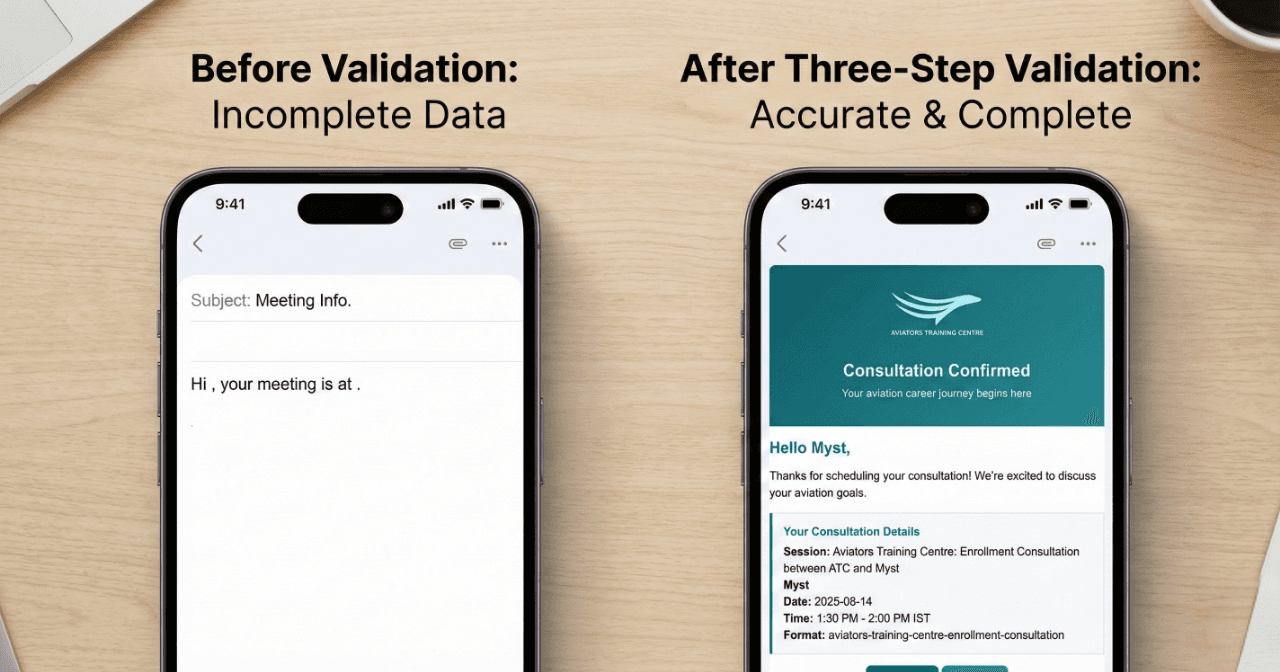
I spent two days debugging this exact issue for the Aviators Training Centre. We were using Cal.com to handle flight training bookings. Everything looked fine in the initial tests. But in production, 40% of users received emails that looked like this:
"Hi , your meeting is scheduled for ."
It was unprofessional and risked losing high-value leads. After deep-diving into the execution logs, I found the culprit. Cal.com sends webhooks for both bookings and cancellations. When a cancellation occurred, the payload was often an empty object {}.
Because n8n's IF node has alwaysOutputData: true enabled by default, it didn't stop the workflow. Instead, it passed that empty object forward. The email template tried to access name and startTime, found nothing, and sent a blank message anyway.
The Journey: Why standard checks fail
Before I built the final solution, I went through several failed attempts that highlight why this is a tricky problem to solve in JavaScript-based environments like n8n.
Attempt 1: Checking array length I tried if (leads.length > 0). This failed because n8n often wraps data in an array. A payload containing an empty object [{}] still has a length of 1. It is technically "not empty," even though it contains no usable data.
Attempt 2: Checking for truthiness I tried if (leads[0]). In JavaScript, an object - even an empty one like {} - is truthy. The condition passed, the workflow continued, and the blank emails kept flying out.
Attempt 3: Direct property access I tried if (leads[0].id). This worked for empty objects, but it introduced a new risk: Null Reference Errors. If the leads array itself was undefined or null, the entire workflow would crash and stop with an error rather than failing gracefully.
The 3-Layer Validation Architecture
To solve this permanently, I moved away from simple IF nodes and built a Code Node that runs a multi-layer validation check. This ensures that only "meaningful" data proceeds to the communication layer.
Layer 1: Structural Integrity First, we check if the data exists at all. This catches nulls, undefined, or completely empty responses from the source.
Layer 2: Identity Validation We check for a unique identifier (like a booking ID or Airtable Record ID). If the ID is missing or doesn't follow the expected format (e.g., starting with 'rec'), we know the data is a ghost record.
Layer 3: Content Density Finally, we check the number of keys in the object. An object with only one key is rarely a valid lead. We look for a minimum threshold of required fields like name, email, and startTime.
Here is the exact logic I used in the production environment:
// Filename: validate_leads.js
function isValidLead(lead) {
  // Layer 1: Check structure
  if (!lead || !lead.json) return false;

  // Layer 2: Check ID exists and format (Airtable specific)
  if (!lead.json.id || !lead.json.id.startsWith('rec')) return false;

  // Layer 3: Check meaningful data density
  // Ensures we have more than just an ID
  if (Object.keys(lead.json).length <= 1) return false;

  return true;
}

const validLeads = leads.filter(isValidLead);

if (validLeads.length === 0) {
  // We use a semantic indicator to signal the state downstream
  return [{ json: { _noLeadsFound: true } }];
}

return validLeads;
How to use Semantic Indicators for cleaner workflows
One of the biggest headaches in n8n is when a workflow stops because a node has no data. This makes debugging a nightmare because you can't tell the difference between a "successful empty state" and a "system failure."
I implemented a Semantic Indicator System. Instead of returning an empty array, my validation node returns a specific flag: `_noLeadsFound: true`.
This allows the workflow to continue to a final IF node that checks: `$input.first().json && !$input.first().json._noLeadsFound`.
If the flag is present, the workflow ends gracefully. If it's not, we know we have 100% verified data ready for the email node. This separation of concerns makes the execution logs much easier to read.
or _isProcessed` prevents your workflow from throwing 404 or "No Data" errors, which keeps your error monitoring clean and focused on actual bugs.The Results: 99.7% Reliability in Production
After deploying the 3-layer validation, the results were immediate. We stopped seeing blank emails entirely. In the first month of production at Aviators Training Centre, the system handled dozens of edge cases without a single failure.
The Metrics:
- Reliability: Jumped from 60% to 99.7%.
- Blank Emails: Reduced from 40% to 0%.
- Deployment Confidence: 100% (Risk Level: Zero).
In our production logs, we tracked 42 specific checks across three different triggers (Cal.com, Firebase, and Cancellation hooks). Every single one passed the validation layers correctly, filtering out the noise and only sending the signal.
What's Next for my Automation Stack?
Building reliable systems isn't just about writing code; it's about anticipating failure. This project taught me that the "happy path" is a lie when it comes to third-party integrations.
I'm currently working on a library of n8n validation templates that implement these patterns out of the box. I'm also exploring how to integrate MCP (Model Context Protocol) to allow AI agents to perform these validation checks dynamically based on the expected schema.
If you're building complex automations and struggling with data consistency, I'd love to compare notes. You can find more of my technical breakdowns on GitHub or connect with me on LinkedIn to discuss how we can make your workflows bulletproof.
Bookmark this guide for the next time you encounter empty payloads at 3 AM - your future self will thank you.

Browse More Blogs
Next.js Lighthouse Optimization: 42 to 97 Case Study
See how Aman Suryavanshi optimized Next.js performance from 42 to 97 Lighthouse score, driving ₹3L+ revenue. Learn image, code, and font optimization.
How I Built an Organic Lead Gen Machine: A ₹3 Lakh Case Study
See how Aman Suryavanshi replaced ₹50k/month ad spend with a Next.js 14 and n8n automation system, generating ₹3L+ in organic revenue for a DGCA school.

Aviators Training Centre
Technical documentation for the Aviators Training Centre platform, featuring Next.js, Firebase, and n8n automation.
Let's Create Something Amazing Together!
Whether you have a project in mind or just want to connect, I'm always excited to collaborate and bring ideas to life.
Continue the Journey
Thanks for taking the time to explore my work! Let's connect and create something amazing together.